Home/Modules/e-Leave
Subscribe to this module only

Leave rules, balances and approvals—handled consistently.

Automate entitlement, carry-forward and approval routing while giving employees a clear self-service experience on web and mobile.
Accurate leave balances Faster approvals Complete transaction history
e-Leave software screen
Why this module matters

Make the process easier to run—and harder to get wrong.

BizCloud turns company rules into a consistent operating workflow, while keeping authorised people in control of exceptions.

01

Policy becomes workflow

Configure leave types, proration, carry-forward and employee-type entitlement instead of calculating them manually.

02

Approvals that match reality

Use multi-level AND, OR and group logic for simple or complex approval structures.

03

HR stays in control

Bulk adjustment, manual burn, reports and transaction tools handle exceptions without losing traceability.

Feature deep dives

Explore the workflows behind the module.

Open a focused page for detailed controls, process steps and the exact product screens used for each capability.

Module-specific pages
e-Leave feature

Leave Entitlement, Carry-Forward & Holidays

Configure leave allocation, proration, same-type accumulation, cross-type carry-forward and company holidays.

Explore feature
e-Leave feature

Leave Applications, Self-Service & Approvals

Apply from web or mobile and route requests through multi-level AND, OR and employee-group approvals.

Explore feature
e-Leave feature

Leave Adjustments, Reports & Transactions

Handle exceptions with bulk adjustments, leave burn and transaction controls while keeping reports available to HR.

Explore feature
Comprehensive capabilities

More control without more manual work.

Manage entitlement, applications, approvals, carry-forward, adjustments, holidays and reporting in one traceable leave workflow.

Configurable leave types, entitlement rules and prorated or full-allocation options for new employees.
Multi-level approval using AND, OR and employee-group logic for practical routing.
Same-type year-to-year accumulation and cross-type carry-forward into a designated leave type.
Corporate and special holidays, with company holiday memo generation for a selected period.
Bulk leave adjustments for one employee or a group, backed by a transaction trail.
Employee application history, personal leave policy and leave dashboard access.
Claim-leave handling and combined leave/claim approval for authorised managers.
Apply from the web or BizCloud app, including supervisor applications on behalf of a colleague.
Leave summary, detailed leave and unpaid-leave reports for HR review.
Manual or automatic leave burn plus controlled leave-transaction adjustment.
Scheduled monthly leave processing keeps entitlement rules consistently applied.
Real product screens

See what your team will actually use.

These are current BizCloud software screens corresponding to the capabilities described above—not concept illustrations.

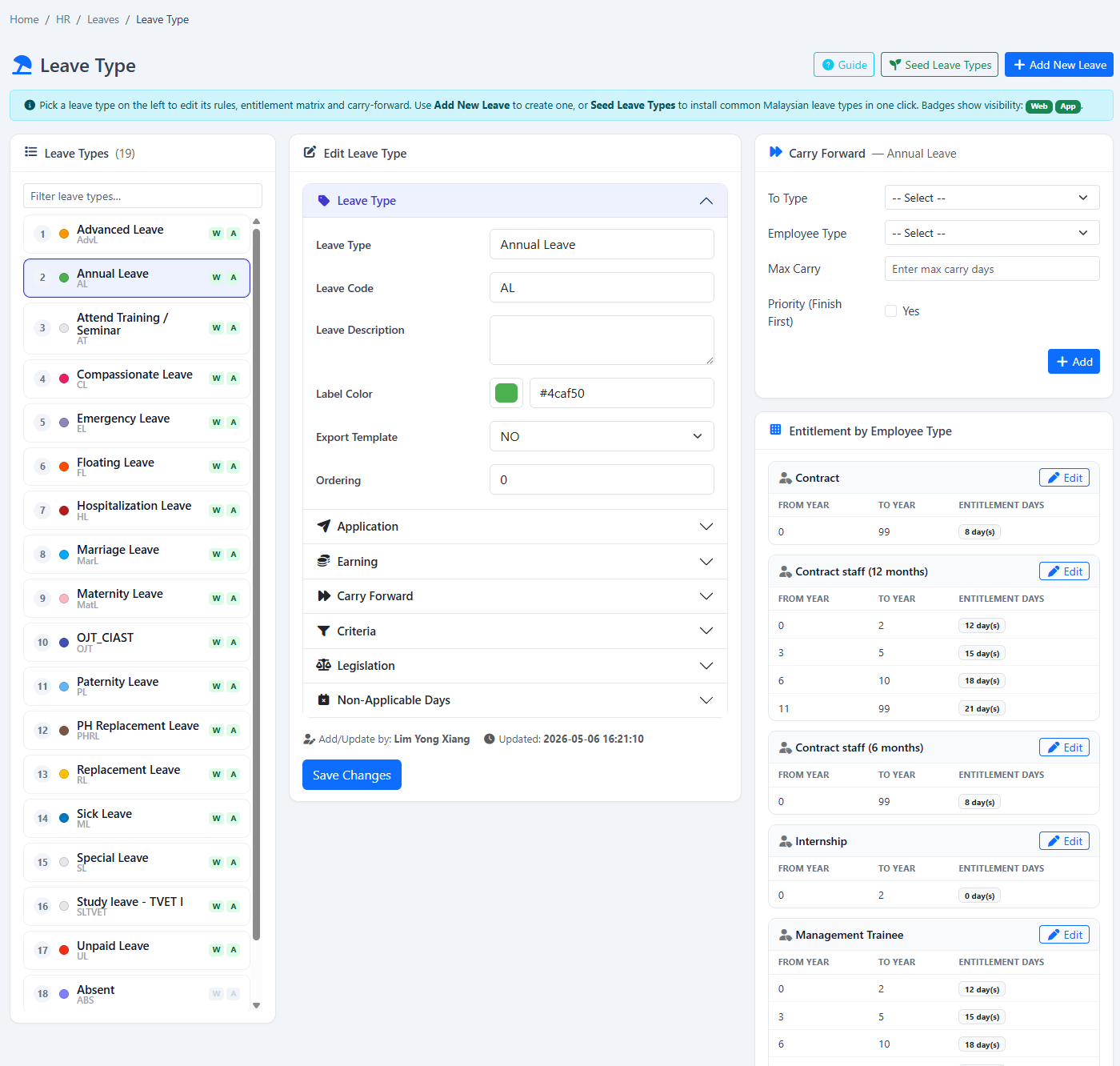
Leave type settingsDefine entitlement, allocation and leave behaviour.
Multi-level approvalRoute decisions with group, AND and OR approval logic.
Carry-forward rulesControl same-type and cross-type leave carry-forward.
Holiday memoGenerate a company holiday memo for a selected year or period.
Special holidayRecord sudden or one-off company holidays.
Bulk leave adjustmentAdjust one or multiple employee balances with control.
Application historyLet employees review previous leave applications and outcomes.
Personal leave policyShow the policy and entitlement that apply to the signed-in employee.
Leave dashboardGive employees and HR a clear view of leave activity.
Claim leaveHandle leave that becomes claimable under company policy.
Leave and claim approvalsKeep outstanding approval decisions visible to managers.
Leave reportsReview leave balances, usage and employee summaries.
Unpaid leave reportReview unpaid-leave activity for payroll and HR follow-up.
Manual leave burnApply an authorised leave burn when manual control is required.
Leave transactionsInspect and adjust the transaction history behind employee balances.
Expand when it makes sense

Use e-Leave on its own—or connect the next module later.

You keep the flexibility to subscribe based on the processes and budget that matter now.